Accessible Medical Service Pages That Support Appointments
Learn how medical service pages can explain care, set expectations, support accessibility, and guide patients toward informed appointment decisions.
In this article
Before asking a patient to book, a service page should explain what the service is, who it may be intended for, what the appointment involves, how to request access accommodations, and where to get help with questions that cannot be answered online. It should distinguish general information from individualized medical advice and make the next step usable for people with different access needs.
- State the service fit and appointment format in plain language.
- Make booking, accommodation requests, and alternatives equally discoverable.
- Test the page and scheduling flow with keyboards, screen readers, and mobile devices.
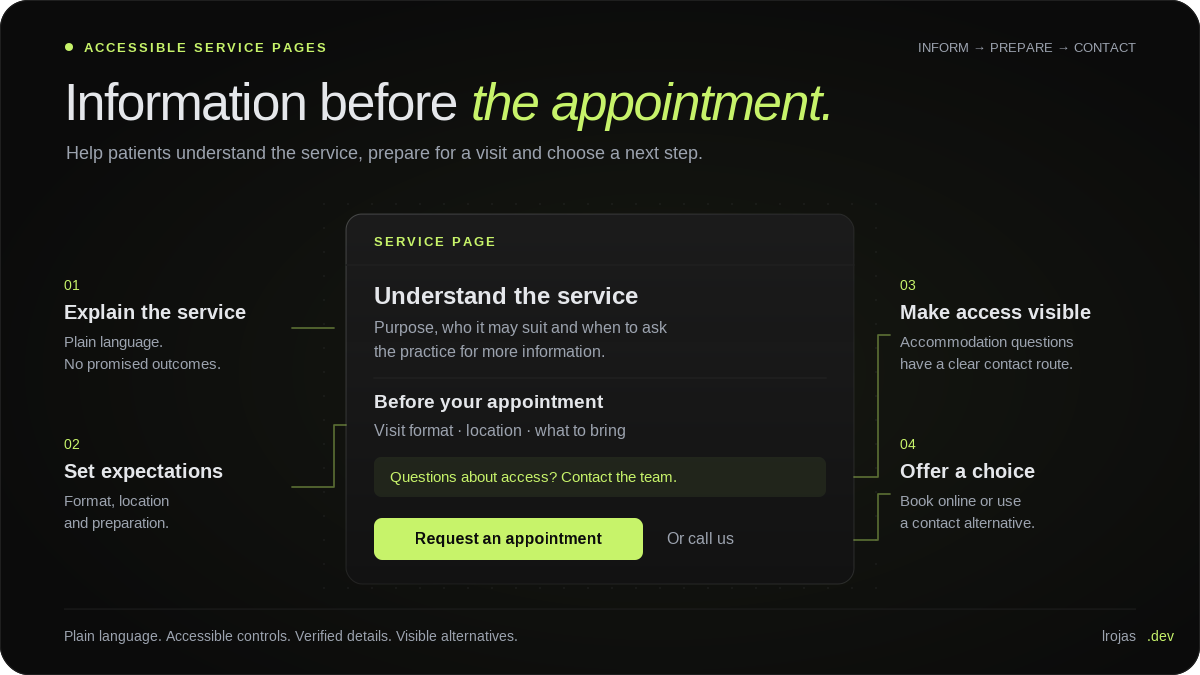
Explain the Service, Intended Patient, and Appropriate Next Step
A service page should help prospective patients decide whether a service is relevant before presenting a booking control. Start with a plain-language description of the service and its general purpose. Explain the concern, activity, evaluation, or support associated with it without diagnosing the reader or promising a result. The goal is orientation, not individualized medical advice.
Describe who may typically contact the practice, such as new or existing patients, adults, children, caregivers, or patients referred by another provider, depending on the actual workflow. If insurance, referral, age, location, or prior records affect eligibility, state the requirement clearly and explain how patients can verify it.
Describe what the visit generally involves. For example, it may include discussing the patient’s goals, reviewing relevant information, and explaining possible next steps. Avoid implying that every visit follows an identical sequence. Use “may,” “typically,” or similarly bounded language when the experience depends on the patient, provider, or appointment type.
Distinguish among booking online, calling the practice, requesting clarification, and contacting the practice before booking. Patients may need to ask about a referral, accommodation, location, language service, or whether the practice can address a particular need. ADA.gov advises medical offices to ask when a patient calls to make an appointment whether assistance will be needed during the examination. This supports inviting access-related questions early rather than treating them as an afterthought.
Set Expectations for the Appointment Before Asking Patients to Book
A booking request is more useful when patients understand the appointment’s practical conditions. State whether the visit is in person, by phone, or through telehealth. If multiple formats are available, explain how patients select one and whether the choice depends on the service or practice policy. Include verified location, suite, parking, arrival, and check-in details.
Give an expected duration or appointment stage when the practice can support that information. If timing varies, explain the factors. Patients may need to plan transportation, work, caregiving, interpretation, or rest breaks. The page need not guarantee a precise schedule; it should provide enough context for a reasonable decision.
Explain what patients may need to bring or complete, such as identification, insurance information, a referral, medication list, prior records, or forms. Do not request sensitive information in a public form or more than the workflow requires. If forms are available before the visit, explain where to find them and whether they can be completed in advance. A resource from Switchboard TA recommends preparing forms before the appointment when possible and considering interpreter support while forms are completed.
Set expectations for follow-up without describing a clinical outcome. Explain whether the practice will confirm the appointment, send reminders, request information, or provide instructions for a later visit. Make cancellation and rescheduling visible rather than burying them in a confirmation email.
A scheduling interface should collect only information needed to route or confirm an appointment. It should not replace a private conversation with the practice. Research on web-based medical appointment systems supports treating online scheduling as part of a broader service workflow, not the entire patient relationship.
Make Service Information and Appointment Actions Accessible
Accessibility is part of the service page’s information architecture and conversion engineering, not a decorative layer added after launch. Organize the page with a meaningful heading hierarchy covering the service, intended patients, appointment details, access information, questions, and booking. Screen reader users should be able to understand the structure by navigating headings.
Use readable text, adequate spacing, and sufficient color contrast. Do not communicate important status information through color alone. Links should describe their destination, such as “Request an accommodation” or “Call the scheduling team,” rather than “click here.” Informative images and icons need useful text alternatives; decorative images should not interrupt reading order.
Every appointment field needs a visible, programmatically associated label and concise instructions when needed. Group related options, identify required fields, and explain formats before submission. Forms should support keyboard navigation without trapping focus or skipping controls. Level Access identifies clear labels and instructions, screen-reader compatibility, and smooth keyboard navigation as requirements for accessible healthcare forms.
Place an error summary near the top of the form, identify affected fields, and explain corrections in plain language. Preserve correctly entered information when validation fails. Ensure confirmation, timeout, and availability messages are announced to assistive technology and remain visible long enough to understand.
The booking call to action should be easy to locate without becoming aggressive. A consistent “Request an appointment” or “Book this service” control can appear after the overview and appointment details. Its label should accurately describe what happens next. If it opens a third-party scheduler, identify that transition and verify keyboard use, focus states, labels, error recovery, and mobile layouts.
Performance supports accessibility and completion. Compress assets, reduce unnecessary scripts, and test the complete page, including embedded scheduling tools, for Core Web Vitals and sub-second latency where feasible. Technical SEO should reinforce the structure through semantic HTML, accurate titles, descriptive metadata, and valid structured data. The relevant web development service scope includes responsive implementation and cross-browser, performance, and accessibility testing.
Explain Access, Accommodations, and Alternatives to Online Booking
Tell patients how to raise access needs before the appointment. Use a direct, private contact path such as a phone number, secure message option, or clearly identified accommodation form. Explain what the practice needs to prepare—not what a patient must disclose about a diagnosis. A useful prompt might ask what assistance, communication format, equipment, or scheduling adjustment would help the patient use the service.
Publish only verified facility details. Depending on the location, these may include entrance routes, elevator access, accessible parking, restroom access, door width, check-in arrangements, adjustable examination equipment, and whether a support person or interpreter can attend. Do not label a facility “fully accessible” based on an assumption or outdated vendor description. Identify which team can confirm details when the page cannot provide a reliable answer.
Explain how the practice handles accommodation requests. For example, staff may review the request, contact the patient if clarification is needed, and note it for the appointment team. Avoid promising that every arrangement is immediately available. Provide a realistic contact path and enough lead time for coordination when applicable.
Online booking must not be the only route. Show a phone number near the primary booking action, with hours and information about what the scheduling team can help with. If the practice offers text, email, relay, interpreter, or in-person scheduling, state the option and any privacy limitations. Patients who cannot use a mouse, have limited internet access, do not want a portal, or need to discuss an accommodation should not have to search the site for an alternative.
The booking form can use a bounded scope: collect appointment type, preferred timing, contact details, and a short access-related note, then route the request to the appropriate team. Keep clinical questions out of general lead capture. ADA.gov’s guidance on medical care for people with mobility disabilities illustrates why scheduling and examination access need to be considered together rather than treated as separate website concerns.
Use a Pre-Booking Readiness Checklist
Before publishing, review the service page as a decision journey rather than a brochure. First, test service fit: can prospective patients identify what the service generally addresses, who may use it, and whether they should contact the practice before booking? The page should answer without diagnosis, individualized recommendations, or guaranteed outcomes.
Next, test appointment readiness. Confirm that the page explains format, approximate timing or stages, location or telehealth process, arrival expectations, likely forms, and general follow-up. Where information varies, say what varies and provide a contact route. This is more useful than an overly precise statement the scheduling team cannot consistently support.
Then test access. Patients should find accommodation instructions without exposing private information in a public comment field. Facility descriptions must be current and verified. State how to request help, ask questions before booking, and use alternatives when online scheduling is unsuitable.
Test interaction quality by using a keyboard to reach every link, button, field, menu, and scheduler control. Check visible focus, heading order, labels, instructions, errors, confirmation states, zoom, text resizing, contrast, and mobile layout. Test the embedded booking tool separately from the surrounding page. A practical healthcare accessibility guide from ADA Site Compliance emphasizes that patients use medical websites to learn about services and book appointments, making both content and interaction part of access.
Finally, test the operational handoff. Confirm that submissions reach the correct scheduling queue, incomplete requests receive a usable response, and staff know how to handle accommodation questions without requesting unnecessary information. Automation can help with routing, reminders, and error logging, but it should not obscure a human contact option. Verify that confirmation messages match actual practice policy and that no automation implies a clinical decision.
A readiness review is complete when the page makes the next step clear without pressuring patients to act before understanding the service. Clear information, accessible controls, verified access details, and visible alternatives create a more dependable appointment path and a basis for improving the page over time.
Sources and references
Have a project in mind?
Tell me about your project and I'll show you how to build a fast website, improve your search visibility, or automate your workflows.
Related reading
Build an Accessible Medical Practice Website That Converts
A practical guide to building an accessible medical practice website that loads fast, supports ADA expectations, and turns local searches into patient inquiries
Technical SEO for Medical Practices: Audit Checklist
Use this technical SEO audit checklist to improve your medical practice website’s visibility, performance, accessibility, and patient conversions.
How Core Web Vitals Affect Service Business Conversions
Learn how page speed and Core Web Vitals influence service-business leads, bounce rates, and conversion paths, with practical optimization guidance.