Provider Pages vs. Specialty Pages in Medical SEO
Learn how U.S. medical websites can separate provider and specialty pages by intent, entity, and internal links to improve navigation and avoid cannibalization.
In this article
Provider pages help patients evaluate a specific clinician, while specialty and service pages help them understand an offering and choose a path to care. Provider pages should own clinician facts, credentials, access details, and booking actions. Specialty and service pages should own care scope, procedures, pathways, locations, and related providers. Location pages should own facility access information. Keep these facts in clearly defined content models and connect the pages with purposeful internal links.
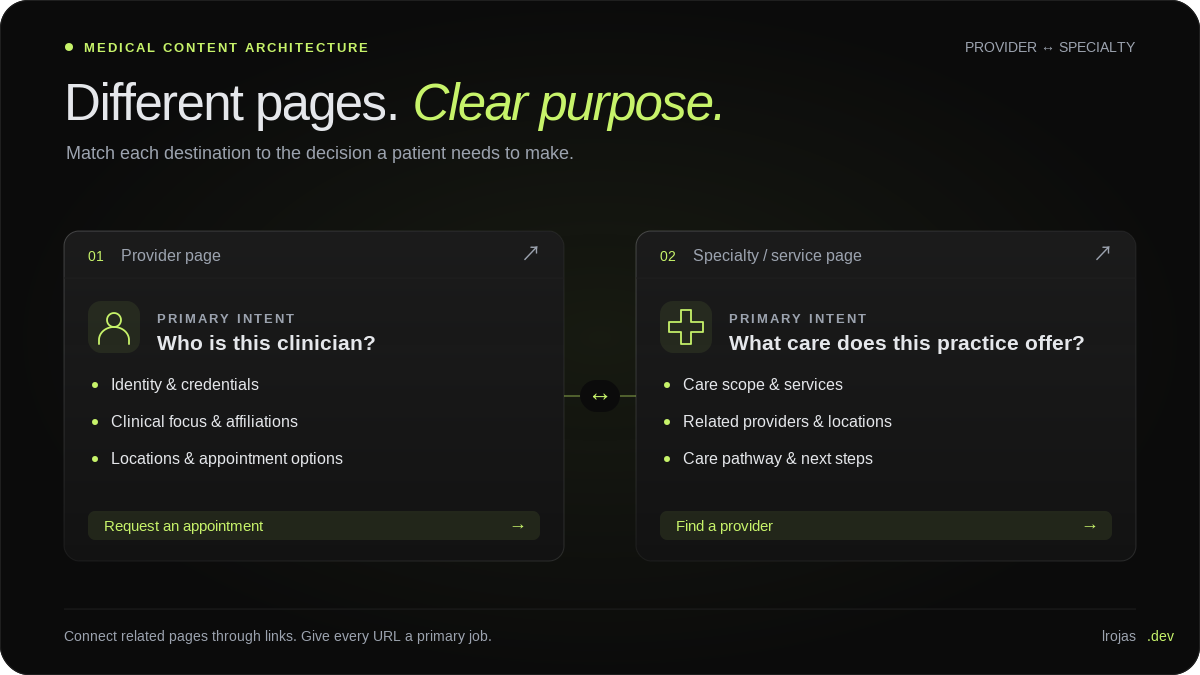
- Provider pages answer “Who is this clinician?”
- Specialty and service pages answer “What care does this practice offer?”
- A shared entity model prevents duplication, ambiguity, and competing URLs.
Define the Two Page Types by Search Intent
The distinction begins with search intent, not the website’s organizational chart. A provider page serves someone evaluating an individual clinician who may want to confirm credentials, focus, location, language, insurance participation, or appointment options. Its central entity is the provider.
A specialty or service page serves someone researching a category of care, condition-related service, procedure, location, or next step. Its central entity is the specialty or service, with clinicians as supporting entities.
These intents can overlap but should not be collapsed into one page. A clinician may practice cardiology, while a cardiology page explains the practice’s scope, locations, care pathways, and associated providers. The provider page should not become a duplicate cardiology landing page merely because the clinician is affiliated with that specialty.
This separation supports useful information architecture. Google recommends crawlable, logically organized websites and people-first content created for the intended audience rather than primarily to manipulate search visibility (SEO Starter Guide; Creating helpful, reliable, people-first content).
Local searches often need location and access information; condition and treatment searches need dedicated service or educational destinations. DexCare likewise describes specialty-location landing pages and verified provider information as separate but complementary search assets (DexCare).
A practical ownership rule is:
- Provider page: facts that identify, qualify, and help users contact or book the clinician.
- Specialty page: the practice’s scope within a clinical specialty.
- Service page: a specific offering, procedure category, or care pathway.
- Location page: access information for a facility or geographic market.
This structure gives each URL a primary job, reduces cannibalization, and avoids repeating biographies, service descriptions, or addresses.
What Belongs on a Provider Page
Core fields commonly include the provider’s name, title, credentials, specialty affiliations, languages, locations, accepted insurance where applicable, appointment options, and professional biography. Education, certifications, hospital affiliations, publications, and other qualifications should appear only when verified and maintained. Medical SEO guidance treats specific, verifiable credentials as important trust signals (DexCare).
The biography should establish professional context without becoming a general specialty article. It can explain the clinician’s role, focus, training, and affiliated departments. A short “services and specialties” module can link to the relevant destinations instead of reproducing their explanations.
Make practical access information easy to find, including office locations, hours, accepted plans, telehealth availability, appointment instructions, and patient-portal links where applicable. These details require operational ownership: stale insurance or location data creates both a user-experience and entity-consistency problem.
Calls to action should be provider-focused, such as “Request an appointment with [Name],” “View availability,” or “Contact this office.” Route the action into the actual lead-capture or scheduling system, not a generic contact page unless that is the deliberate workflow.
A provider page may reference specialties, services, and locations, but model those relationships as links rather than repeated prose. This keeps the page bounded and clarifies relationships between medical entities.
Structured data can reinforce the model. Schema.org defines Physician as the relevant type for a physician entity. Use supported properties that reflect visible, accurate content; do not add credentials, affiliations, reviews, or services the page does not substantiate. Markup should clarify the page, not compensate for thin or unreliable content.
Each provider should have one preferred canonical profile URL. Avoid near-duplicates for every location, insurance combination, or specialty label unless they have a distinct purpose and materially different information. If a clinician works at multiple offices, show those locations on the provider page and link to the relevant location pages.
What Belongs on a Specialty or Service Page
A specialty page explains a clinical domain at the practice level. A service page explains a more specific offering or pathway. Both should address service-level intent rather than one clinician’s biography.
The page should establish what the specialty or service is called in patient-friendly language, what the practice offers, where it is available, and what visitors should do next. Depending on the organization, it may include related conditions, procedures, referral requirements, care settings, age ranges, locations, insurance guidance, and appointment options. Content should remain within the site’s approved clinical and editorial scope; this article concerns architecture and ownership, not clinical advice.
A specialty page can link to related service pages or condition-focused educational resources. A service page can link to its parent specialty, relevant locations, and providers who actually offer it. This creates a navigable hierarchy without making every destination restate the same explanation.
Identify appropriate providers with a “care team” or “providers offering this service” component generated from maintained relationships rather than copied biographies. Each card should link to the provider’s canonical profile and show concise, verified attributes such as name, credentials, location, and appointment action.
A multi-location group may need a specialty-location page when the combination represents a genuine patient pathway with distinct availability, access information, and provider relationships. It should not automatically generate a thin URL for every combination. This reflects Google’s people-first guidance (Google Search Central).
Offer a clear next action: request an appointment, contact the department, find a location, or begin an authorized referral process. Align it with intent. Someone researching a specialty may need a provider directory or location selector; someone seeking a specific service may be ready for direct scheduling.
Use one title and primary heading for the specialty or service, descriptive URL paths, meaningful section headings, and crawlable links. Do not use a provider’s name as the primary title unless the URL is actually a provider page.
Workflow automation can connect a service page to form submission, validation, routing, and confirmation. A webhook may send a qualified request to a CRM or scheduling queue, while error logging and delivery verification protect reliability. If a relevant non-clinical payment or deposit is accepted, a Stripe integration may be part of the conversion path, but it should not obscure appointment actions or collect unnecessary health information.
Build a Data Model That Prevents Duplication
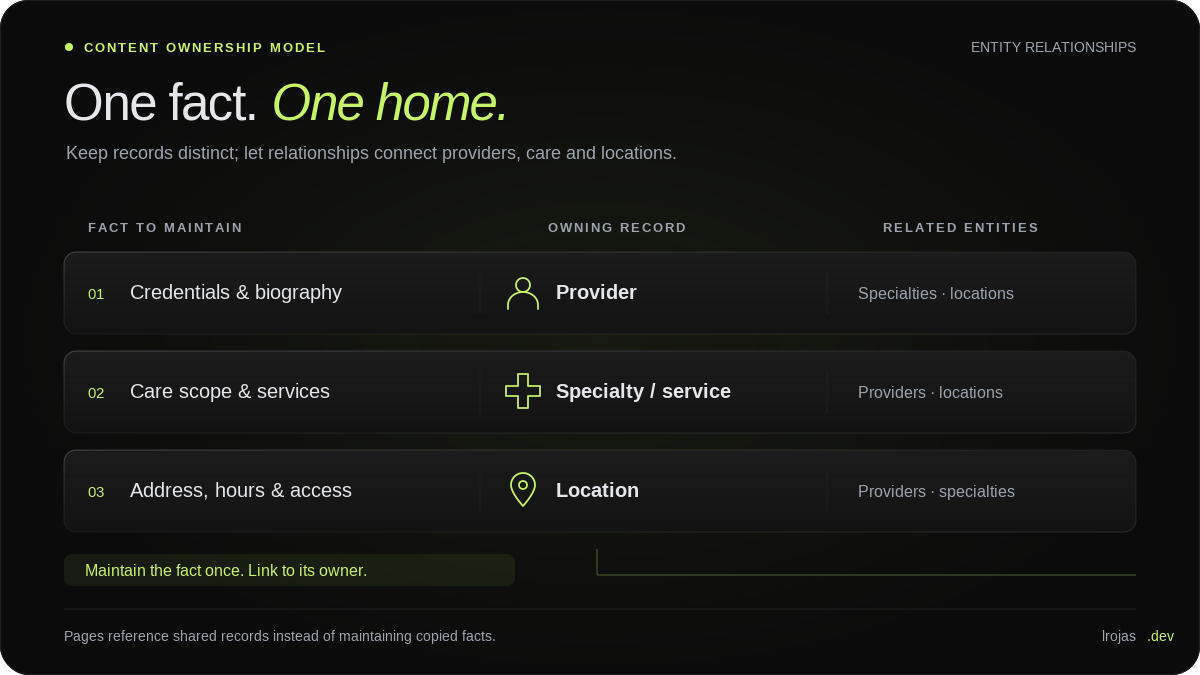
Separate entities from page templates. At minimum, maintain distinct records for providers, specialties, services, locations, and appointment actions. A content management system can then assemble pages from relationships instead of having editors paste facts into multiple URLs.
A provider record might contain the canonical name, credentials, biography, languages, affiliations, linked specialties and services, locations, and booking endpoint. A specialty record might contain its public name, parent department, related services, associated providers, and locations. A service record can contain its public label, parent specialty, eligible locations, provider relationships, conversion route, and reviewed content fields.
Location records should own the address, phone number, hours, accessibility details, directions, and facility-level appointment options. Appointment actions should be reusable destinations with an owner, status, and routing rule.
Maintain each field once wherever practical. A provider’s credentials should not be separately edited on the provider page, every specialty page, and every location page. Pages should reference the same source record. Workflow automation can trigger review or publication updates when an approved provider record changes. Systems supporting webhooks can notify connected applications; the HubSpot Webhooks API documents this event-driven pattern. A structured workspace can also act as a content source when synchronized through an API such as the Notion API.
Structured data should follow the same ownership model. Schema.org provides Physician for the individual clinician and MedicalClinic for a clinic entity. A provider page can identify the physician and accurately connect the organization or location. A clinic or location page can identify the MedicalClinic and its supported specialties. Markup should not imply that every provider offers every service or every location provides every specialty.
Do not treat structured data as a replacement for visible content. Google emphasizes useful, accessible, organized pages; schema is a supporting signal, not a license to publish unsupported properties (SEO Starter Guide). Validate markup, keep it synchronized with rendered content, and remove it when a relationship ends.
Use stable canonical URLs, accurate XML sitemaps, indexable navigation, and redirect rules when records merge. Test provider directories and specialty pages against Core Web Vitals, especially image payloads, JavaScript, and third-party scheduling widgets. Sub-second latency can be a useful target for key interactions, but evaluate implementation with real performance data rather than a blanket promise.
Use Internal Links to Connect, Not Compete
Internal links should express relationships between entities, not force every page to rank for every related phrase.
A specialty or service page should link to providers who offer it, using the provider’s actual name as anchor text. Provider pages should link to relevant specialties, services, locations, and appointment paths, with descriptive anchors such as “Cardiology services” or “Services offered at the Downtown location.”
Location pages can link to specialties available at the facility, providers who practice there, and location-specific appointment routes. Specialty pages can link to locations where the service is available. These relationships help users move from “what care?” to “who provides it?” to “where can I access it?”
Important pages should be reachable through normal navigation and not depend solely on filters, client-side interactions, or internal search. Google recommends crawlable links and an organized site structure (SEO Starter Guide). A JavaScript filter can improve directory usability, but provider and specialty URLs should remain independently discoverable.
Anchor text should describe the destination. “Meet providers offering [service]” is clearer than “Our team,” and “View [Name]’s locations” is clearer than “Details.” Avoid stuffing location, specialty, and procedure terms into every anchor.
Keep conversion paths visible without making them identical everywhere. A provider page may prioritize “Request an appointment with [Name],” while a specialty page may prioritize “Find a provider” or “Choose a location.” Align the action with the visitor’s decision.
Accessibility is part of the linking model. Use real links, meaningful text, keyboard-accessible controls, and clear form labels. If a directory uses filtering, preserve a usable path for keyboard and screen-reader users. The web.dev Forms guidance covers accessible structure, validation, submission, security, and autofill.
For teams improving the architecture and technical implementation, Organic Growth & SEO is the relevant service scope. It includes technical SEO remediation, Core Web Vitals work, sitemap management, content structure, and local business data consistency; it does not imply guaranteed rankings or paid acquisition.
A Practical Decision Framework for Auditing Existing Pages
Start with an inventory of URLs, templates, redirects, indexed status, internal links, and conversion destinations. Export titles, headings, canonical tags, structured data types, linked providers, locations, and services. The objective is to identify unclear ownership, not merely duplicate wording.
Classify each URL by primary intent:
- Provider intent: a named clinician or a page whose primary purpose is evaluating one person.
- Specialty intent: a broad clinical category or department.
- Service intent: a specific offering, procedure category, or care pathway.
- Location intent: access information for a facility or geographic area.
- Educational intent: an informational resource that should not be confused with a provider or service landing page.
Assign each URL an owning entity. If a clinician-titled page mostly explains a service, decide whether it should become a provider page with a concise service summary or a service page with a provider directory. Do not leave the ambiguity in place simply because both topics are relevant.
Move facts to their proper owners. Provider credentials, biography, languages, and clinician-specific appointment information belong in provider records. Specialty scope, services, locations, and care pathways belong in specialty or service records. Facility address and hours belong in location records. Remove copied blocks where the source page can provide a summary and direct link.
Establish reciprocal internal links. Every provider should connect to applicable specialties, services, locations, and appointment actions. Every service page should connect to relevant providers and locations. Review accuracy, anchor text, crawlability, and accessibility. The goal is a coherent graph of medical entities, not a high volume of cross-links.
Audit structured data after correcting the content model. Use Physician for provider entities and MedicalClinic for clinic entities where those types accurately describe the visible page. Check that names, addresses, affiliations, services, and URLs agree across rendered content, markup, and authoritative records. Schema.org defines the vocabulary, but the organization remains responsible for accuracy.
Check the conversion path from each page type. A provider page should reach a provider-specific request or scheduling flow. A specialty page should offer a sensible route to providers, locations, or service intake. Forms need clear labels, validation, error states, privacy-appropriate fields, and confirmation behavior. If a CRM or scheduling system receives submissions, test the full pipeline, including authenticated webhooks, delivery verification, duplicate handling, and error logging.
Consolidate overlapping URLs when they serve the same intent and entity. Select the strongest canonical destination, update internal links, and use a relevant redirect when an old URL should no longer stand alone. Do not redirect a genuinely distinct page merely to reduce URL count, but do not preserve thin near-duplicates to expand search coverage.
Afterward, monitor indexing, crawl paths, search queries, form completion, and performance. Review the model when providers join or leave, services move locations, or appointment workflows change. Clear ownership and a repeatable audit process keep provider and specialty pages complementary rather than competitive.
Sources and references
Have a project in mind?
Tell me about your project and I'll show you how to build a fast website, improve your search visibility, or automate your workflows.
Related reading
Structured Data for Physicians and Medical Clinics
Learn how physician and medical clinic structured data supports clearer search context, local service details, validation, and realistic SEO expectations.
How Service Businesses Earn Citations in AI Search
A practical guide for U.S. service businesses to improve ChatGPT search visibility and earn credible citations through technical SEO and useful content.
Local SEO Architecture for Specialist Medical Practices
Build a compliant local search system for specialist practices with Google Business Profile, location pages, reviews, technical SEO, and tracking.